
كيفية نشر نموذج معالجة لغة طبيعية باستخدام FastAPI
 Aldawsari
 مقدمة: لماذا يُعد نشر نموذج NLP خطوة حاسمة؟
إذا كنت تعمل في مجال معالجة اللغة الطبيعية، فإن بناء النموذج وحده لا يكفي. القيمة الحقيقية تظهر عندما يتحول النموذج من تجربة محلية إلى خدمة يمكن للتطبيقات والأنظمة الأخرى استخدامها فعلياً داخل بيئة الإنتاج. هذه العملية تُعرف باسم نشر النموذج، وهي تعني دمج النموذج في نظام قائم ليستقبل مدخلات ويُرجع تنبؤات قابلة للاستخدام في اتخاذ القرار.
توجد عدة خيارات شائعة لنشر نماذج NLP مثل Flask وDjango وBottle، لكن FastAPI أصبح خياراً مفضلاً لدى كثير من المطورين بفضل سرعته وسهولة استخدامه ودعمه التوثيق التفاعلي تلقائياً.
في هذا الدليل العملي ستتعرف على كيفية:
- بناء نموذج بسيط لتصنيف مراجعات أفلام
IMDBإلى إيجابية أو سلبية. - فهم إطار العمل
FastAPIوطريقة تثبيته. - نشر النموذج على هيئة واجهة
REST API. - استخدام النموذج المنشور من داخل أي تطبيق مكتوب بلغة
Python.
بناء نموذج NLP لتصنيف مراجعات الأفلام
سنستخدم مجموعة بيانات IMDB Movie Reviews لإنشاء نموذج يستطيع تحديد ما إذا كانت المراجعة إيجابية أو سلبية. الهدف هنا ليس فقط التدريب، بل إعداد نموذج يمكن نشره لاحقاً بسهولة.
استيراد الحزم الأساسية
نبدأ باستيراد الحزم اللازمة لتحميل البيانات، وتنظيف النصوص، وبناء نموذج التصنيف، ثم حفظه لاستخدامه لاحقاً أثناء النشر.
# import important modules
import numpy as np
import pandas as pd

# sklearn modules
from sklearn.model_selection import train_test_split
from sklearn.pipeline import Pipeline
from sklearn.naive_bayes import MultinomialNB # classifier
from sklearn.metrics import (
 accuracy_score,
 classification_report,
 plot_confusion_matrix,
)
from sklearn.feature_extraction.text import TfidfVectorizer, CountVectorizer

# text preprocessing modules
from string import punctuation

# text preprocessing modules
from nltk.tokenize import word_tokenize
import nltk
from nltk.corpus import stopwords
from nltk.stem import WordNetLemmatizer
import re #regular expression

# Download dependency
for dependency in (
 "brown",
 "names",
 "wordnet",
 "averaged_perceptron_tagger",
 "universal_tagset",
):
 nltk.download(dependency)

import warnings
warnings.filterwarnings("ignore")

# seeding
np.random.seed(123
تحميل مجموعة البيانات
يتم تحميل الملف من مجلد البيانات باستخدام pandas:
# load data
data = pd.read_csv("../data/labeledTrainData.tsv", sep='\t')
ويمكن عرض أول الصفوف للتأكد من بنية البيانات:
# show top five rows of data
data.head()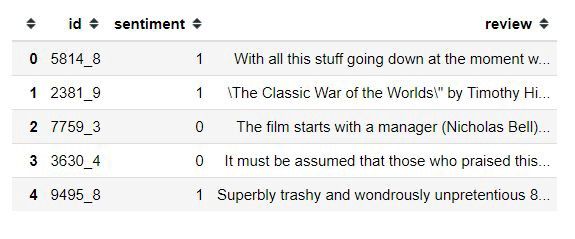
تضم مجموعة البيانات ثلاثة أعمدة رئيسية:
id: المعرّف الخاص بكل مراجعة.sentiment: التصنيف، حيث تمثل1مراجعة إيجابية و0مراجعة سلبية.review: نص المراجعة نفسه.
فحص حجم البيانات والقيم المفقودة
# check the shape of the data
data.shape
(25000, 3)
هذا يعني أن لدينا 25,000 مراجعة جاهزة للتدريب والتقييم.
# check missing values in data
data.isnull().sum()

id           0
sentiment    0
review       0
dtype: int64
لا تحتوي البيانات على قيم مفقودة، وهي نقطة مهمة قبل بدء أي معالجة.
تحليل توزيع الفئات
قبل التدريب، من الجيد التحقق من توازن الفئات باستخدام الدالة value_counts():
# evalute news sentiment distribution
data.sentiment.value_counts()

1    12500
0    12500
Name: sentiment, dtype: int64
نلاحظ أن البيانات متوازنة تماماً بين المراجعات الإيجابية والسلبية، وهذا يجعل مقياس accuracy مناسباً للتقييم في هذه الحالة.
معالجة النصوص قبل التدريب
النصوص الخام عادةً تحتوي على روابط ورموز وعلامات ترقيم وكلمات عامة كثيرة لا تفيد النموذج. لذلك سننفذ مرحلة تنظيف للنصوص لتحسين جودة المدخلات.
دالة تنظيف النصوص
الدالة text_cleaning() ستتولى إزالة العناصر غير الضرورية، ثم تنفيذ عملية lemmatization لتحويل الكلمات إلى صيغها الأساسية.
stop_words = stopwords.words('english')

def text_cleaning(text, remove_stop_words=True, lemmatize_words=True):
    # Clean the text, with the option to remove stop_words and to lemmatize word

    # Clean the text
    text = re.sub(r"[^A-Za-z0-9]", " ", text)
    text = re.sub(r"\'s", " ", text)
    text = re.sub(r'http\S+', ' link ', text)
    text = re.sub(r'\b\d+(?:\.\d+)?\s+', '', text)  # remove numbers

    # Remove punctuation from text
    text = ''.join([c for c in text if c not in punctuation])

    # Optionally, remove stop words
    if remove_stop_words:
        text = text.split()
        text = [w for w in text if not w in stop_words]
        text = " ".join(text)

    # Optionally, shorten words to their stems
    if lemmatize_words:
        text = text.split()
        lemmatizer = WordNetLemmatizer()
        lemmatized_words = [lemmatizer.lemmatize(word) for word in text]
        text = " ".join(lemmatized_words)

    # Return a list of words
    return (text)
بعد ذلك نطبق الدالة على عمود المراجعات:
#clean the review
data["cleaned_review"] = data["review"].apply(text_cleaning)
تحديد المتغيرات وتقسيم البيانات
سنستخدم العمود cleaned_review كمدخلات تدريب، بينما سيكون العمود sentiment هو الهدف المطلوب التنبؤ به.
#split features and target from data
X = data["cleaned_review"]
y = data.sentiment.values
ثم نقسم البيانات إلى جزء للتدريب وآخر للاختبار بنسبة 15% للتحقق من الأداء:
# split data into train and validate
X_train, X_valid, y_train, y_valid = train_test_split(
    X,
    y,
    test_size=0.15,
    random_state=42,
    shuffle=True,
    stratify=y,
)
إنشاء نموذج تصنيف المشاعر
سنستخدم خوارزمية Multinomial Naive Bayes، وهي من أكثر الخوارزميات انتشاراً في تصنيف النصوص بسبب بساطتها وكفاءتها العالية مع الميزات النصية.
تحويل النص إلى تمثيل رقمي
قبل تدريب النموذج، يجب تحويل النصوص إلى أرقام يمكن للخوارزمية التعامل معها. سنعتمد على TfidfVectorizer لتحويل مجموعة الوثائق النصية إلى مصفوفة من ميزات TF-IDF.
ولتنفيذ جميع الخطوات بسلاسة، سنضع المعالجة والتصنيف داخل كائن Pipeline.
# Create a classifier in pipeline
sentiment_classifier = Pipeline(steps=[
    ('pre_processing', TfidfVectorizer(lowercase=False)),
    ('naive_bayes', MultinomialNB())
])
تدريب النموذج وتقييمه
# train the sentiment classifier
sentiment_classifier.fit(X_train, y_train)
# test model performance on valid data
y_preds = sentiment_classifier.predict(X_valid)accuracy_score(y_valid, y_preds)
0.8629333333333333حقق النموذج دقة تقارب 86.29%، وهي نتيجة جيدة بالنسبة لنموذج أولي بسيط لتصنيف المشاعر.
حفظ النموذج لاستخدامه في النشر
بعد الانتهاء من التدريب، نحفظ النموذج باستخدام مكتبة joblib حتى نتمكن من تحميله لاحقاً داخل تطبيق FastAPI.
#save model
import joblib
joblib.dump(sentiment_classifier, '../models/sentiment_model_pipeline.pkl')
ما هو FastAPI ولماذا يُستخدم؟
FastAPI هو إطار عمل حديث وسريع لبناء واجهات برمجية باستخدام Python. يتميز بأداء مرتفع، وصياغة واضحة، وقدرته على إنشاء توثيق تفاعلي تلقائي دون الحاجة إلى إعدادات إضافية معقدة.

يعتمد FastAPI على مكتبتين أساسيتين:
Starletteلإدارة الجوانب المتعلقة بالويب والطلبات.Pydanticللتحقق من البيانات ومعالجتها.
كما يُعد خياراً ممتازاً عند الحاجة إلى الأداء الجيد ودعم العمليات غير المتزامنة async.
تثبيت FastAPI وخادم التشغيل
لتثبيت FastAPI، نفّذ الأمر التالي:
pip install fastapiوستحتاج أيضاً إلى خادم ASGI مثل uvicorn لتشغيل التطبيق:
pip install uvicornنشر نموذج NLP باستخدام FastAPI
سنحوّل النموذج المدرّب إلى واجهة API يمكن استدعاؤها عبر طلبات HTTP. سنضع الكود في ملف باسم main.py.
استيراد الحزم المطلوبة
# text preprocessing modules
from string import punctuation

# text preprocessing modules
from nltk.tokenize import word_tokenize
import nltk
from nltk.corpus import stopwords
from nltk.stem import WordNetLemmatizer
import re # regular expression
import os
from os.path import dirname, join, realpath
import joblib
import uvicorn
from fastapi import FastAPI
تهيئة تطبيق FastAPI
app = FastAPI(
    title="Sentiment Model API",
    description="A simple API that use NLP model to predict the sentiment of the movie's reviews",
    version="0.1",
)
هنا قمنا بتخصيص:
- عنوان الواجهة البرمجية.
- وصف مختصر للخدمة.
- رقم الإصدار.
تحميل النموذج المحفوظ
# load the sentiment model
with open(
    join(dirname(realpath(__file__)), "models/sentiment_model_pipeline.pkl"),
    "rb"
) as f:
    model = joblib.load(f)
إعادة استخدام دالة تنظيف النصوص
يجب أن تكون خطوات تنظيف النص وقت التنبؤ مماثلة لما تم أثناء التدريب، حتى لا تختلف طبيعة المدخلات ويضعف الأداء.
def text_cleaning(text, remove_stop_words=True, lemmatize_words=True):
    # Clean the text, with the option to remove stop_words and to lemmatize word

    # Clean the text
    text = re.sub(r"[^A-Za-z0-9]", " ", text)
    text = re.sub(r"\'s", " ", text)
    text = re.sub(r"http\S+", " link ", text)
    text = re.sub(r"\b\d+(?:\.\d+)?\s+", "", text)  # remove numbers

    # Remove punctuation from text
    text = "".join([c for c in text if c not in punctuation])

    # Optionally, remove stop words
    if remove_stop_words:
        # load stopwords
        stop_words = stopwords.words("english")
        text = text.split()
        text = [w for w in text if not w in stop_words]
        text = " ".join(text)

    # Optionally, shorten words to their stems
    if lemmatize_words:
        text = text.split()
        lemmatizer = WordNetLemmatizer()
        lemmatized_words = [lemmatizer.lemmatize(word) for word in text]
        text = " ".join(lemmatized_words)

    # Return a list of words
    return text
إنشاء نقطة التنبؤ Endpoint
سنضيف مساراً باسم /predict-review باستخدام الطلب من نوع GET.
@app.get("/predict-review")نقطة النهاية هي عنوان الاستقبال الذي تتواصل عبره التطبيقات مع الواجهة البرمجية. عند استدعاء هذا المسار، سيتم تنفيذ دالة التنبؤ.
@app.get("/predict-review")
def predict_sentiment(review: str):
    """
    A simple function that receive a review content and predict the sentiment of the content.
    :param review:
    :return: prediction, probabilities
    """
    # clean the review
    cleaned_review = text_cleaning(review)

    # perform prediction
    prediction = model.predict([cleaned_review])
    output = int(prediction[0])
    probas = model.predict_proba([cleaned_review])
    output_probability = "{:.2f}".format(float(probas[:, output]))

    # output dictionary
    sentiments = {0: "Negative", 1: "Positive"}

    # show results
    result = {
        "prediction": sentiments[output],
        "Probability": output_probability
    }
    return result
تقوم هذه الدالة بالخطوات التالية:
- استقبال نص المراجعة من المستخدم.
- تنظيف النص عبر الدالة
text_cleaning(). - تمرير النص المنظف إلى النموذج.
- استخراج التصنيف النهائي واحتماله.
- إرجاع النتيجة بصيغة
JSON.
الملف الكامل main.py
# text preprocessing modules
from string import punctuation

# text preprocessing modules
from nltk.tokenize import word_tokenize
import nltk
from nltk.corpus import stopwords
from nltk.stem import WordNetLemmatizer
import re # regular expression
import os
from os.path import dirname, join, realpath
import joblib
import uvicorn
from fastapi import FastAPI

app = FastAPI(
    title="Sentiment Model API",
    description="A simple API that use NLP model to predict the sentiment of the movie's reviews",
    version="0.1",
)

# load the sentiment model
with open(join(dirname(realpath(__file__)), "models/sentiment_model_pipeline.pkl"), "rb") as f:
    model = joblib.load(f)

# cleaning the data
def text_cleaning(text, remove_stop_words=True, lemmatize_words=True):
    # Clean the text, with the option to remove stop_words and to lemmatize word

    # Clean the text
    text = re.sub(r"[^A-Za-z0-9]", " ", text)
    text = re.sub(r"\'s", " ", text)
    text = re.sub(r"http\S+", " link ", text)
    text = re.sub(r"\b\d+(?:\.\d+)?\s+", "", text)  # remove numbers

    # Remove punctuation from text
    text = "".join([c for c in text if c not in punctuation])

    # Optionally, remove stop words
    if remove_stop_words:
        # load stopwords
        stop_words = stopwords.words("english")
        text = text.split()
        text = [w for w in text if not w in stop_words]
        text = " ".join(text)

    # Optionally, shorten words to their stems
    if lemmatize_words:
        text = text.split()
        lemmatizer = WordNetLemmatizer()
        lemmatized_words = [lemmatizer.lemmatize(word) for word in text]
        text = " ".join(lemmatized_words)

    # Return a list of words
    return text

@app.get("/predict-review")
def predict_sentiment(review: str):
    """
    A simple function that receive a review content and predict the sentiment of the content.
    :param review:
    :return: prediction, probabilities
    """
    # clean the review
    cleaned_review = text_cleaning(review)

    # perform prediction
    prediction = model.predict([cleaned_review])
    output = int(prediction[0])
    probas = model.predict_proba([cleaned_review])
    output_probability = "{:.2f}".format(float(probas[:, output]))

    # output dictionary
    sentiments = {0: "Negative", 1: "Positive"}

    # show results
    result = {
        "prediction": sentiments[output],
        "Probability": output_probability
    }
    return result
تشغيل واجهة API
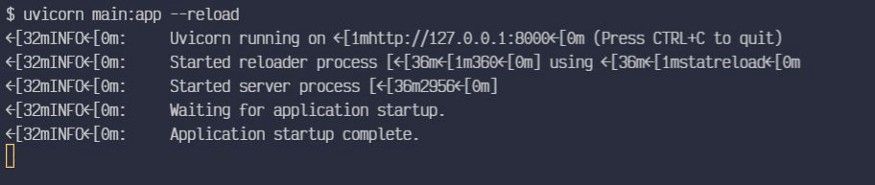
لتشغيل التطبيق محلياً استخدم الأمر التالي:
uvicorn main:app --reloadمعنى الأجزاء السابقة هو:
main: اسم الملفmain.py.app: كائن التطبيق الذي أُنشئ بالسطرapp = FastAPI().--reload: إعادة تشغيل الخادم تلقائياً عند تعديل الكود، وهو مفيد أثناء التطوير.
الوصول إلى التوثيق التفاعلي
يوفر FastAPI صفحة توثيق تفاعلية تلقائية. بعد تشغيل التطبيق، انتقل إلى الرابط http://127.0.0.1:8000/docs من المتصفح.
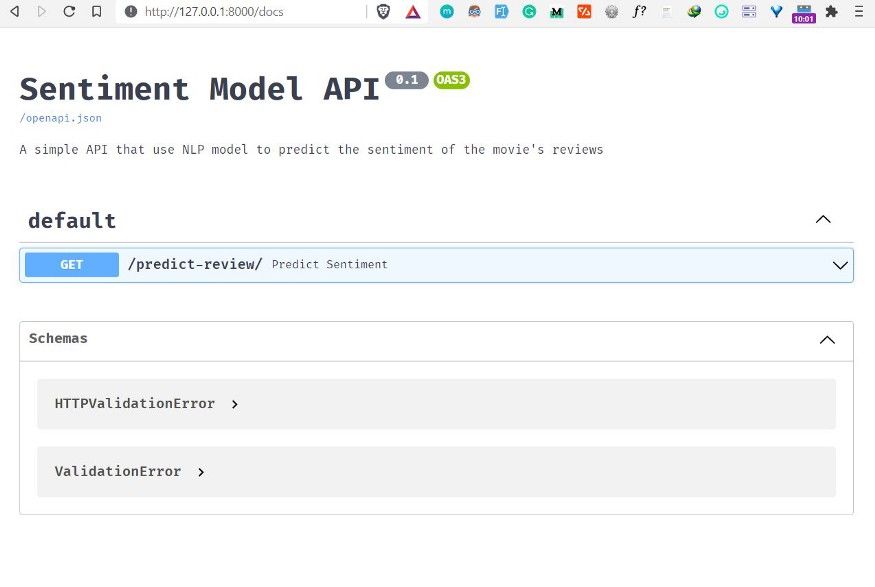
ستظهر لك معلومات الواجهة، مثل الاسم والوصف والإصدار، إضافة إلى قائمة المسارات المتاحة للتفاعل المباشر.
اختبار نقطة التنبؤ من المتصفح
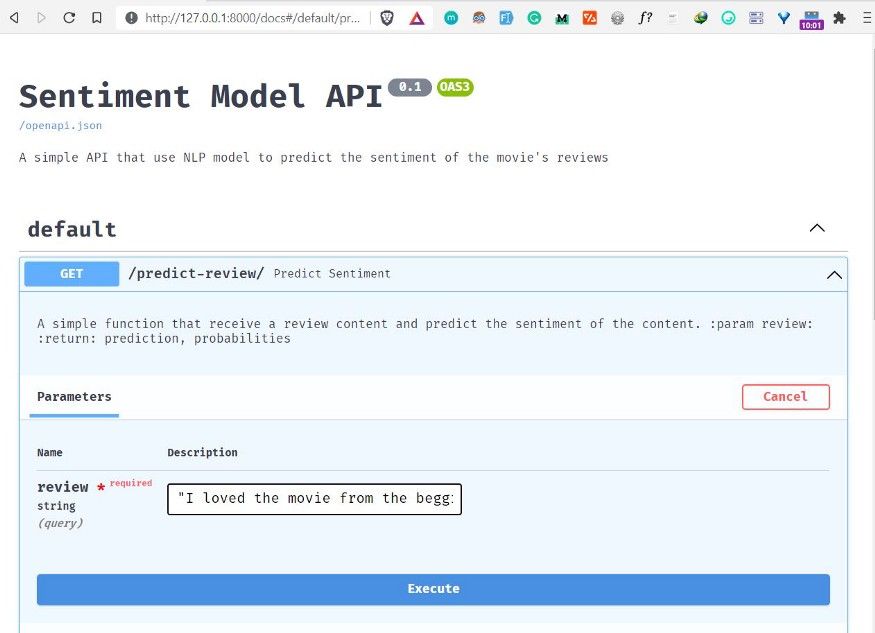
لاختبار الخدمة:
- افتح المسار
predict-review. - اضغط زر
Try it out. - أدخل نص مراجعة فيلم في الحقل المطلوب.
- اضغط
Executeللحصول على التنبؤ.
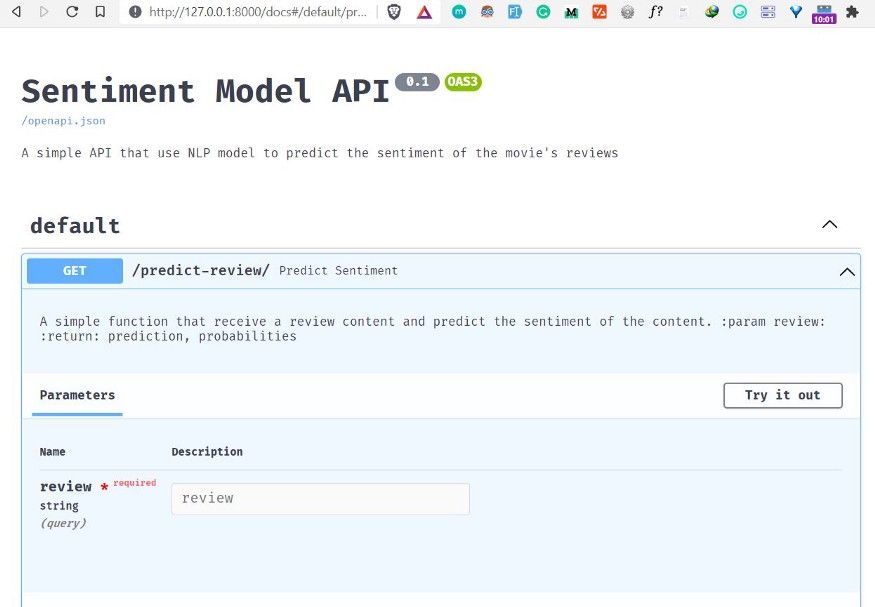
في المثال التطبيقي، أُدخلت مراجعة إيجابية لفيلم Zack Snyder’s Justice League، ثم أُرسلت إلى النموذج لتحليل المشاعر.
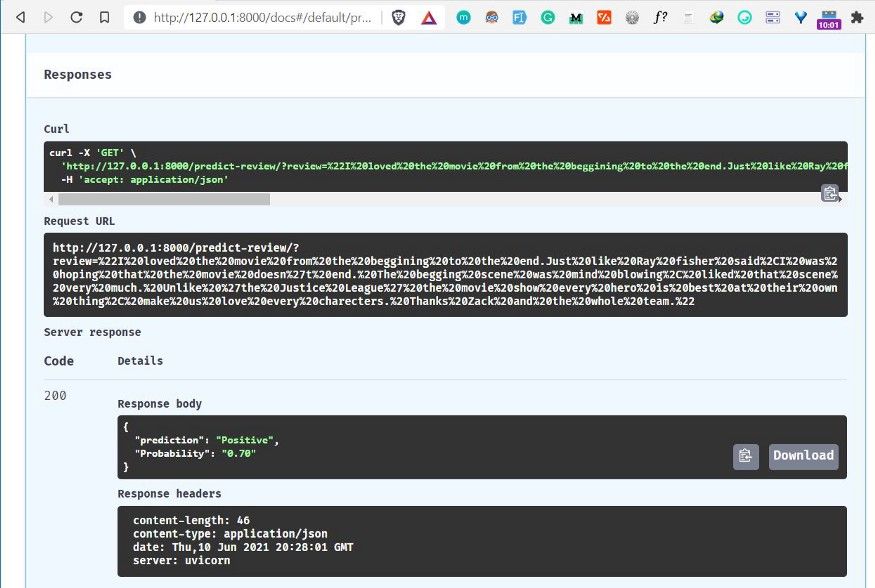
أظهرت النتيجة أن النموذج صنّف المراجعة على أنها إيجابية باحتمال 0.70.
استخدام نموذج NLP المنشور داخل أي تطبيق Python
بعد نشر النموذج، يمكنك استدعاؤه من أي تطبيق خارجي. سنستخدم مكتبة requests لإرسال طلب HTTP إلى الواجهة البرمجية.
تثبيت مكتبة requests
pip install requestsإنشاء ملف عميل بسيط
أنشئ ملفاً باسم python_app.py، ثم استورد المكتبة:
import requests as rأضف نص مراجعة ترغب في تحليلها:
# add review
review = "This movie was exactly what I wanted in a Godzilla vs Kong movie. It's big loud, brash and dumb, in the best ways possible. It also has a heart in a the form of Jia (Kaylee Hottle) and a superbly expressionful Kong. The scenes of him in the hollow world are especially impactful and beautifully shot/animated. Kong really is the emotional core of the film (with Godzilla more of an indifferent force of nature), and is done so well he may even convert a few members of Team Godzilla."
مرّر النص إلى الطلب عبر معلمة review:
keys = {
    "review": review
}
ثم أرسل الطلب إلى المسار المنشور:
prediction = r.get("http://127.0.0.1:8000/predict-review/", params=keys)وأخيراً اعرض النتيجة:
results = prediction.json()
print(results["prediction"])
print(results["Probability"])
ستظهر نتيجة مشابهة لما يلي:
Positive
0.54
أفضل ممارسات مهمة قبل النشر الفعلي
رغم أن المثال السابق مناسب للتعلّم وبناء نموذج أولي، فإن النشر في بيئة إنتاج حقيقية يتطلب الانتباه إلى بعض الجوانب الإضافية:
- التحقق من صحة المدخلات وتحديد طول المراجعة المقبول.
- إضافة معالجة للأخطاء في حال فشل تحميل النموذج أو تعذر التنبؤ.
- تثبيت إصدارات الحزم داخل ملف
requirements.txt. - التأكد من توحيد خطوات المعالجة بين التدريب والإنتاج.
- التفكير في استخدام طلبات
POSTبدلاً منGETعند التعامل مع نصوص طويلة. - مراقبة الأداء والزمن المستغرق في التنبؤ عند زيادة عدد الطلبات.
الخلاصة التقنية
يُعد الجمع بين نموذج تصنيف نصوص مبني باستخدام scikit-learn وإطار FastAPI خياراً عملياً وسريعاً لتحويل النماذج التجريبية إلى خدمات قابلة للاستهلاك برمجياً. الميزة الأهم هنا ليست فقط سهولة كتابة الكود، بل القدرة على إنشاء واجهة موثقة تلقائياً يمكن اختبارها فوراً. وإذا أردت تطوير هذا المشروع لاحقاً، فابدأ بتحسين جودة المعالجة النصية، واعتماد نماذج أقوى، ثم تغليف الخدمة داخل بيئة إنتاج آمنة وقابلة للتوسع.